Ordering proces.
How to order at Nissan-autoparts.nl
A step-by-step guide for ordering on our English webshop. Questions? Send us an e-mail and we are happy to help.
Step 1: Choose your part
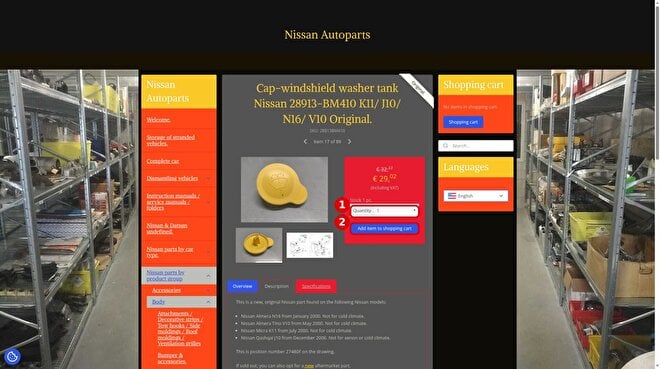 Open the product page of the part you need and check the part number, price (incl. VAT) and stock. (1) Enter the quantity. (2) Click Add item to shopping cart.
Step 2: Go to the shopping cart
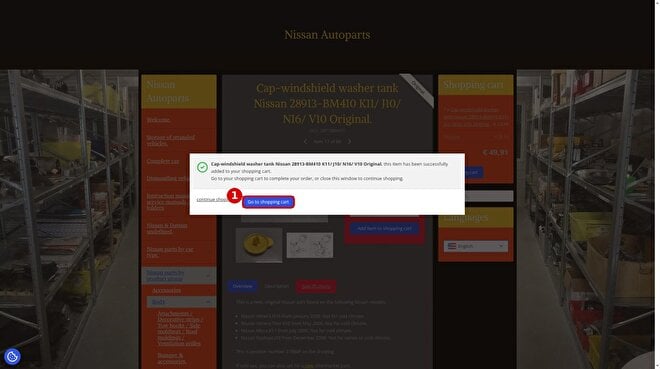 A pop-up confirms the item was added. (1) Click Go to shopping cart, or click continue shopping to add more parts first.
Step 3: Check your shopping cart
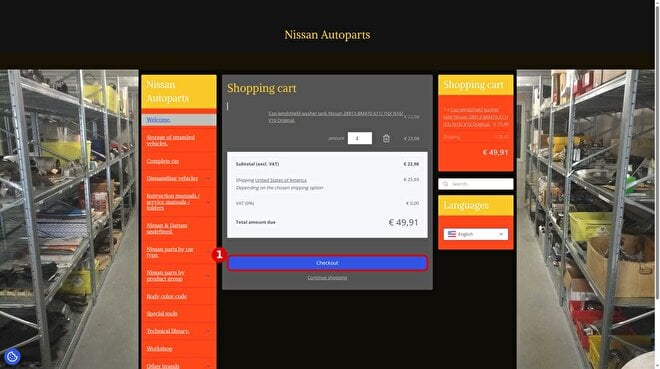 Check the items and quantities. Important: first select your country in the shipping line of the cart (it shows United States by default). The shipping cost and total are then calculated for your country. (1) Click Checkout. You do not need an account: you can order as a guest.
Step 4: The checkout page
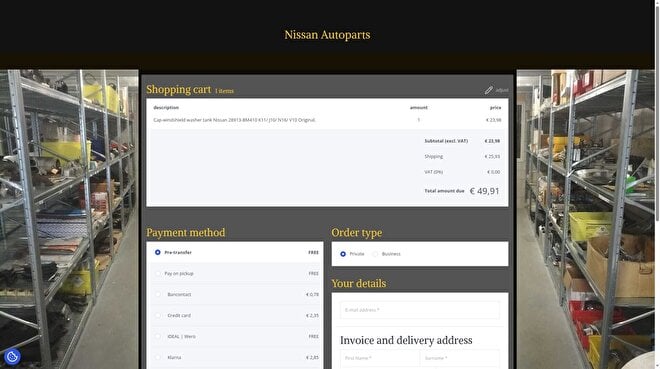 Everything is done on one page: payment method, shipment, order type and your details. At the top you see your order summary. Under Order type, choose Private or Business.
Step 5: Enter your details and shipping
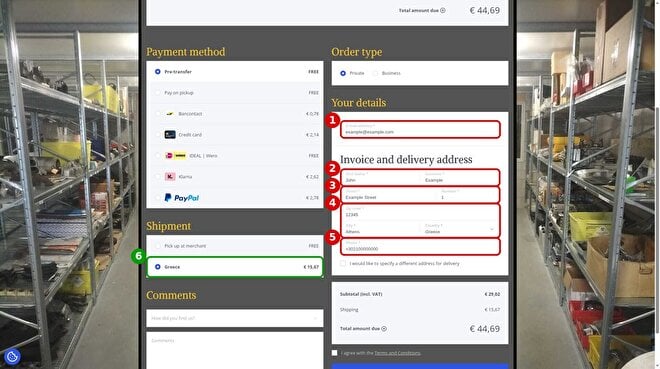 Check that the Country matches the country you selected in the cart. If you change it here, wait a few seconds before filling in the other fields. (1) E-mail address. (2) First name and surname. (3) Street and house number. (4) Zip code, city and country. (5) Phone number. (6) Under Shipment, select the shipping option for your country (here: Greece). Do not choose 'Pick up at merchant' unless you collect the part in person in Surhuizum, the Netherlands. Want delivery to another address? Tick 'I would like to specify a different address for delivery'.
Step 6: Payment and placing the order
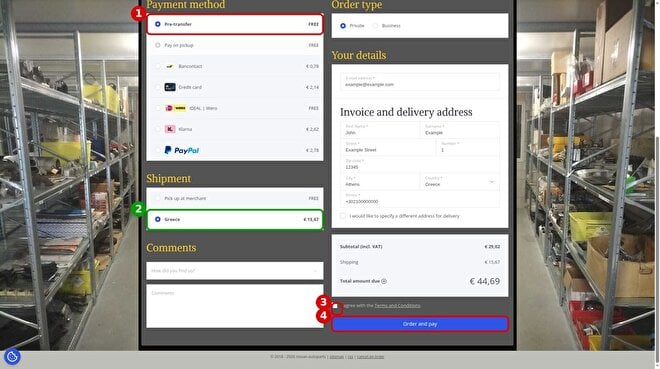 (1) Choose a payment method: Pre-transfer (bank transfer, free), credit card, PayPal, Klarna, iDEAL | Wero or Bancontact. Some methods have a small fee, shown next to the option. (2) Check that your shipping option is selected and check the total. (3) Tick I agree with the Terms and Conditions. (4) Click Order and pay.
Nissan Autoparts
- Welcome.
-
- Storage of stranded vehicles.
-
- Complete car
-
-
Dismantling vehicles
- Datsun Cherry E10.
- Datsun Cherry F10.
- Datsun Sunny B110.
- Nissan 100NX B13.
- Nissan Almera N15.
- Nissan Almera N16.
- Nissan Almera Tino V10.
- Nissan Bluebird T72.
- Nissan Micra K10.
- Nissan Micra K11.
- Nissan Micra K12/ CK12.
- Nissan Micra K14.
- Nissan Prairie M11.
- Nissan Primera P11.
- Nissan Primera P12.
- Nissan Qashqai J11.
- Nissan Stanza T11.
- Nissan Sunny N13.
- Nissan Sunny N14.
- Nissan Terrano2 R20.
- Nissan X-Trail T30.
-
-
Instruction manuals / service manuals / folders
- Aftersales gram. (Belgium)
- Body repair manual
- Collision parts catalog
- Consult-II Cd-rom
- Consult-III Cd-rom.
- Course book/ technical training.
- Other / Miscellaneous
- Electronic bodybuilder's drawings.
- Electronic Body Repair Manual.
- Electronic Collision Repair Time Manual
- Electronic Service Manual
- Electronic Wiring diagrams
- Flat rate schedule
- User manual
- Maintenance and warranty booklet/ Pan Europe Service
- Folder user manual
- Operation manual.
- Product Bulletin / Product information.
- Brochure.
- Service Data and Specification.
- Service Flash.
- Service Manual.
- Technical Bulletin.
- Technogram (Belgium)
- Werkplaats handboek / Servicehandleiding / Servicehandboek / Vraagbaak
- Wiring diagrams.
-
- Nissan & Datsun undefined.
-
-
Nissan parts by car type.
- Datsun 240Z/260Z/280Z S30 1969 - 1978
- Datsun Bluebird 510 1968 - 1973
- Datsun Bluebird 610 (160B / 180B ) 1971 - 1977
- Datsun Bluebird 710 (Datsun Violet 710) 160J 1973 - 1977
- Datsun Bluebird 810 1977 - 1980
- Datsun Cedric 230 / Datsun 200C / Datsun 220C / Datsun 240C / Datsun 260C 1971 - 1975
- Datsun Cedric 330 / Datsun 200C / Datsun 220C / Datsun 260C / Datsun 280C 1975 - 1979
-
Datsun Cherry E10 100A / 120A September 1970 - September 1978
-
Body.
- Attachments / Decorative strips / Tow hooks / Side moldings / Roof moldings / Ventilation grilles.
- Skylight and accessories.
- Electrical components (others).
- Emblems.
- Grille front.
- Sheet metal & accessories.
- Windows and accessories.
- Rubbers.
- Windshield wiper system.
- Mirror & accessories.
- Lamps and lighting.
- Interior.
- Engine & transmission
- Chassis.
- Brake system.
- Steering system.
-
Body.
-
Datsun Cherry F10 100A FII/120AFII 1974 - 1978
- Body.
- Interior.
- Engine and transmission.
- Chassis.
- Brake system.
- Tuning & styling.
- Wheels, tires and rims.
- Datsun Laurel C130 1972 - 1977
- Datsun Laurel C230 1977 - 1980
- Datsun Pickup 520/ 521 1965 - 1972
- Datsun Pickup 620 1972 - 1979
- Datsun Silvia S110 1979 - 1983
- Datsun Sunny B10 1966 - 1969
-
Datsun Sunny B110 (Datsun 1200) 1970 - 1973
-
Body.
- Attachments / Decorative strips / Tow hooks / Side moldings / Roof moldings / Ventilation grilles.
- Bumpers & accessories.
- Sill.
- Emblems, labels & stickers.
- Hood and accessories.
- Doors and accessories.
- Front apron & radiator core support.
- Windows and accessories.
- Rubbers & accessories.
- Fixed sheet metal.
- Lamps & lighting.
- Fender-front.
- Interior.
- Engine and transmission.
- Chassis.
- Brake system.
-
Body.
- Datsun Sunny B210 120Y 1973 - 1978
- Datsun Sunny B310 1977 - 1981
- Datsun Violet 160J A10 1977 - 1981
-
Nissan 100NX / NX1600/ NX2000 B13 / oktober 1990 - 1996
- Accessories.
-
Body
- Attachments / decorative strips / tow hooks / side moldings / roof moldings / ventilation grilles
- Bumpers & accessories
- Roof
- Electrical components (others)
- Emblems.
- Cowl top
- Sheet metal and accessories
- Front apron & radiator core support.
- Windows & accessoiries
- Rubbers
- Windshield wiper system
- Mirror & accessories.
- Fuel filler flap and accessories
- Lamps & lighting
- Hoodledge.
- Interior
- Engine & Transmission
- Chassis
- Brake system.
- Steering system.
- Tuning & Styling
- Nissan 200SX S13 July 1988 - March 1994
- Nissan 200SX S14 October 1993 - December 1999
- Nissan 280ZX S130 July 1978 - June 1983
-
Nissan 300ZX Z31 January 1984 - October 1990
- Body
- Interior
- Small material.
- Engine & transmission
- Chassis.
- Brake system.
- Steering system.
- Nissan 300ZX Z32 January 1990 - August 1996
- Nissan 350Z Z33 September 2002 - December 2009
- Nissan 370Z Z34 April 2009 - today
- Nissan Almera G15RA from November 2012
-
Nissan Almera N15 July 1995 - April 2000
- Accessories.
-
Body
- Attachments / decorative strips / tow hooks / side moldings / roof moldings / ventilation grilles.
- Bumpers & accessoires.
- Emblems / logos / stickers
- Grille, front.
- Cowl top.
- Sheet metal and accessories
- Front apron & radiator core support.
- Windows and accessories.
- Rubbers.
- Windshield wiper system.
- Mirrors and accessories.
- Hoodledge.
- Lamps & lighting
- Interior
-
Engine & Transmission
-
Engine & accessories
- Fuel system
- Timing belt / Timing chain & accessories.
- EGR
- Filters & accessoiries
- Intake system
- Internal engine parts.
- Wire harness & accessories.
- Cooling system.
- Oil seal
- Ignition.
- Engine mounting
- Gaskets.
- Pulley
- Belts, guide rollers and tensioners
- Secondary-air-system.
- Lubricating system
- Start & charging.
- Vacuum control
- Flywheel & accessoiries
- Transmission & accessories
-
Engine & accessories
- Chassis
- Brake system
- Steering system
- Styling & Tuning
-
Nissan Almera N16 January 2000 - November 2006 (UK - made)
- Accessories
-
Body
- Attachments / Decorative strips / Tow hooks / Side moldings / Roof moldings / Ventilation grilles
- Bumpers & accessoiries
- Roof
- Electrical components (others)
- Emblems, labels & stickers.
- Grille front
- Cowl top
- Sheet metal and accessories
- Front apron & radiator core support.
- Windows & accessoiries
- Rubbers
- Windshield wiper system
- Mirrors and accessories
- Lamps & lighting
- Interior
-
Engine & Transmission
-
Engine & accessories
- Cover
- Fuel system
- Cylinder head
- Timing belt / Timing chain & accessories
- EGR
- Filters
- Intake system
- Charge air cooler
- Internal engine parts.
- Wire harness & accessoiries
- Cooling system.
- Seal-oil, crankshaft.
- Engine complete
- Ignition
- Engine mounting
- Gaskets.
- Pulley
- Belts, guide rollers, tensioners & idler-pulley
- Secondary-air-system.
- Sensors.
- Lubricating systeem
- Start & charging.
- Turbocharger & accessories
- Exhaust & accessories
- Vacuum control
- Flywheel & accessoiries
- Transmission & accessoiries
-
Engine & accessories
- Chassis
- Brake system
- Steering system
- Tuning & styling.
- Wheels, tires and rims and accessories
-
Nissan Almera Tino V10 May 2000 - November 2005
- Accessories
- Body
- Interior
-
Engine & Transmission
-
Engine & accessories
- Fuel system
- Cylinder head
- Timing belt / Timing chain & accessories.
- EGR
- Filters
- Intake system
- Charge air cooler & accessoiries
- Internal engine parts.
- Cooling system.
- Seal-oil, crankshaft
- Engine bare
- Crankcase ventilation.
- Ignition.
- Engine mounting.
- Gaskets.
- Pulley
- Belts, guide rollers, tensioners & idler-pulley
- Secondary-air-system.
- Sensors
- Start & charging,
- Exhaust & accessories
- Vacuum control
- Transmission & accessoiries
-
Engine & accessories
- Chassis
- Brake system
- Steering system
- Tuning & styling.
- Wheels & accessories.
- Nissan Altima L31 august 2001 - 2006
- Nissan Altima L32
- Nissan Ariya FE0 Februari 2022 - today
- Nissan Atleon
- Nissan Bluebird 910 January 1980 - December 1983
-
Nissan Bluebird T12 December 1985 - February 1990
- Accessories.
-
Body
- Attachments / Decorative strips / Tow hooks / Side moldings / Roof moldings / Ventilation grilles
- Back door & accessories.
- Bumper & accessories.
- Electrical components (others).
- Hood & accessories.
- Cowl-top.
- Doors & accessories.
- Apron-front, upper & radiator core support.
- Windows
- Rubbers
- Windshield wiper system.
- Lid-gas filler.
- Lamps & accessories.
- Interior
-
Engine & Transmission
-
Engine & accessories
- Fuel system
- Cylinder head.
- Timing belt / Timing chain & accessories.
- EGR
- Filters & accessoiries
- Intake system.
- Inner engine parts.
- Wiring harnesses.
- Rocker cover & accessories.
- Cooling-system
- Ignition.
- Engine mounting.
- Gaskets
- Belts, guide rollers and tensioners
- Secondary-air-system
- Sensors
- Lubrication system.
- Start & charging
- Exhaust & accessories.
- Vacuum control
- Transmission & accessories
-
Engine & accessories
- Chassis
- Brake system
- Steering system.
-
Nissan Bluebird T72 July 1986 - April 1990
- Accessories.
-
Body
- Attachments / Decorative strips / Tow hooks / Side moldings / Roof moldings / Ventilation grilles
- Back door & accessories.
- Bumpers & accessories
- Electrical components (others)
- Grille front.
- Hood & accessories.
- Cowl-top.
- Doors & accessories.
- Apron-front, upper & radiator core support.
- Window & accessories
- Rubbers.
- Windshield wiper system
- Mirror & accessories.
- Lid-gas filler.
- Lamp & lighting.
- Fender front & accessories.
- Interior
-
Engine & Transmission
-
Engine & accessories
- Fuel system
- Cylinder head.
- Timing belt / Timing chain & accessoiries,
- EGR
- Filters & accessoiries
- Intake system.
- Inner engine parts.
- Wire harness & accessories.
- Rocker cover & accessories.
- Cooling system.
- Ignition.
- Engine mounting.
- Gaskets
- Belts, guide rollers and tensioners
- Secondary-air-system
- Sensors
- Lubrication system.
- Start & charging.
- Exhaust & accessories.
- Vacuum control
- Flywheel & accessories.
- Engine.
- Transmission & accessories
-
Engine & accessories
- Chassis
- Brake system
- Steering system.
- Wheels tyres & accessoires
-
Nissan Bluebird U11/WU11 November 1983 - May 1990
- Accessories.
-
Body
- Attachments / decorative strips / tow hooks / side moldings / roof moldings / ventilation grilles
- Bumper & accessories.
- Electrical components (others).
- Grille front.
- Hood & accessories.
- Cowl-top.
- Doors & accessories.
- Front apron & radiator core support.
- Windows & accessories
- Rubbers.
- Windshield wiper system.
- Mirror & accessories.
- Lid-gas filler.
- Lamps ang lighting.
- Fender-front and accessories.
- Interior
-
Engine & accessories
-
Engine & accessories
- Fuel system
- Cylinder head.
- Timing belt / Timing chain & accessories.
- EGR
- Filters & accessoiries
- Intake system.
- Inner engine parts.
- Wiring harnesses.
- Rocker cover & accessories.
- Cooling-system.
- Ignition
- Engine mounting.
- Gaskets
- Belts, guide rollers and tensioners
- Secondary-air-system
- Sensors
- Lubrication system.
- Start & charging.
- Exhaust & accessories.
- Vacuum control
- Transmission & accessories
-
Engine & accessories
- Chassis
- Brake system
- Steering system.
- Tuning & styling.
- Nissan Cabstar F22/ H40/ W40 October 1982 - June 1992
- Nissan Cabstar F23 June 1992 - Januari 2011
- Nissan Cabstar F24 September 2006 - December 2013
- Nissan Cabstar TL0
- Nissan Cherry N10 August 1978 - September 1982
-
Nissan Cherry N12 April 1982 - July 1986
- Accessories.
- Body
- Interior
- Engine & Transmission
- Chassis
- Brake system
- Steering system.
- Tuning & styling.
- Nissan Cube Z12 2009 - 2011
- Nissan E-NV200 ME0M February 2018 - today.
- Nissan ECO-T
- Nissan GT-R R35 December 2008 - today
- Nissan Hardbody D22S from January 2006
- Nissan Interstar X70 april 2002 - today
-
Nissan Juke F15 June 2010 - October 2019
- Body
- Interior
-
Engine & Transmission
-
Engine & accessories
- Fuel system
- Cylinder head.
- Timing belt / Timing chain & accessories.
- EGR.
- Filters
- Intake system.
- Internal engine parts.
- Rocker cover and accessories.
- Cooling system.
- Seal-oil, crankshaft.
- Multi-belts, v-belts & Idler pulleys
- Ignition.
- Gaskets
- Pulley.
- Sensors & accessories.
- Lubricating system
- Start & charging.
- Turbocharger & accessories.
- Exhaust & accessories.
- Vacuum control.
- Transmission & accessories
-
Engine & accessories
- Chassis
- Brake system
- Steering system.
- Styling & Tuning
- Nissan Juke F16 October 2019 - Today
- Nissan King Cab Pick-up D21 September 1985 -February 1998
- Nissan King Cab D22 / D22S/ LCD22 February 1998 - Today
- Nissan Kubistar X76 August 2003 - October 2009
- Nissan Laurel Altima 1990+
- Nissan Laurel JC31 1981 - 1985
- Nissan Laurel JC32 January 1985 - December 1989
- Nissan Leaf ZE0 November 2010 - December 2017
- Nissan Leaf ZE1E December 2017 - Today
- Nissan Maxima A32 January 1995 - August 2000
- Nissan Maxima A34 January 2003 - May 2008
- Nissan Maxima CA33 January 2000 - November 2003
- Nissan Maxima J30 December 1988 - June 1994
-
Nissan Micra K10 December 1982 - November 1992
- Accessories.
-
Body
- Attachments / Decorative strips / Tow hooks / Side moldings / Roof moldings / Ventilation grilles
- Bumpers & accessoires.
- Skylight and accessories.
- Electrical components (others).
- Emblem.
- Grille, front.
- Cowl top.
- Metal sheet and accessories.
- Apron-front & radiator core support.
- Windows and accessories.
- Rubbers.
- Windshield wiper system.
- Mirrors and accessories
- Lamps & lighting
- Interior
- Engine & Transmission
- Chassis
- Brake system
- Styling & Tuning.
-
Nissan Micra K11 August 1992 - November 2002
- Accessories
-
Body
- Attachments / Decorative strips / Tow hooks / Side moldings / Roof moldings / Ventilation grilles
- Bumpers & accessories
- Electrical components (others).
- Emblems, labels & stickers.
- Grille front
- Cowl top
- Sheet metal and accessories
- Front apron & radiator core support
- Windows & accessoiries
- Rubbers
- Windshield wiper system.
- Mirrors and accessories
- Lighting and accessories
- Interior
- Small material
- Engine & Transmission
- Chassis
- Brake system
- Steering system
- Styling & Tuning
- Wheel and accessories.
-
Nissan Micra K12/CK12 November 2002 - July 2010
- Accessories.
- Body
- Interior
-
Engine & Transmission
-
Engine & accessories
- Fuel system.
- Timing belt / Timing chain & accessories.
- EGR .
- Filters.
- Intake system
- Internal engine parts.
- Cooling system.
- Seal-oil, crankshaft.
- Ignition
- Engine mounting
- Gaskets
- multi-belts, v-belts & Idler pulleys.
- Sensors.
- Lubricating system
- Start & charging.
- Turbocharger & accessories
- Exhaust & accessories
- Vacuum control.
- Flywheel & accessoiries
- Wire harness.
- Transmission & accessories
-
Engine & accessories
- Chassis
- Brake system
- Styling & Tuning
- Wheels & accessories.
- Nissan Micra K13 May 2010 - January 2017
-
Nissan Micra K14 December 2016 - December 2024.
- Accessories.
- Body
-
Interior.
- Airconditioning & heating
- Dashboard and accessories.
- Glove box ans accessories.
- Finisher front door & accessories.
-
Electrical components.
- Airbag & accessories.
- Audio video navigation & telecommunications.
- ECM / Modules / circuit breaker / Immobiliser / Relay
- Wire harness.
- Combination meter assy-instrument & display.
- Relay box/holder Fuse box and accessories.
- Switch and accessories.
- Sensors & accessories.
- Power socket.
- Lamps and lighting.
- Trunk.
- Roof.
- Plastic interior parts.
- Seat.
- Seat belts & accessories.
- Floor and insulator.
- Sunvisor.
-
Engine & Transmission
-
Engine & accessories
- Fuel system.
- Cylinder head.
- Filters.
- Timing belt / Timing chain & accessories.
- Intake system.
- Internal engine parts.
- Charge air cooler.
- Wire harness.
- Rocker cover and accessories.
- Cooling system.
- Seal-oil, crankshaft.
- Bare engine, lower part.
- Ignition.
- Engine mounting.
- Gaskets.
- Pulley.
- Belts & accessories.
- Sensors.
- Lubricating system
- Start & charging.
- Turbocharger & accessories.
- Exhaust and accessories.
- Vacuum control.
- Flywheel and accessories.
- Transmission & accessoiries
-
Engine & accessories
-
Chassis
- Beam compl-rear suspension.
- Bottom, underside of vehicle.
- Link compl.transverse & Accessories.
- Insulator.
- Plastic parts.
- Stabilizer / reaction bar and accessories.
- Member compl-front suspension & accessories.
- Suspension/ struts/ shock absorbers/ strut bearings.
- Wheel covers Wheel hubs Wheel bearings and accessories.
- Brake system
- Steering system.
- Tuning & styling
- Wheels & accessories
- Nissan Micra K15 July 2025 - today.
- Nissan Murano Z50 August 2003 - September 2008
- Nissan Murano Z51 October 2008 - September 2014
- Nissan Murano Z52 2014 - today
- Nissan Navara NP300 D23M July 2014 - today
- Nissan Navara D40 May 2005 -
-
Nissan Note E11 March 2006 - june 2012
- Accessories.
- Body
- Interior
-
Engine & Transmission
-
Engine & accessories
- Fuel system.
- Timing belt / Timing chain & accessories.
- EGR.
- Filters
- Intake system.
- Internal engine parts.
- Rocker cover and accessories.
- Cooling system.
- Seal-oil, crankshaft.
- Ignition
- Engine mounting
- Gaskets.
- multi-belts, v-belts & Idler pulleys
- Sensors.
- Lubricating system
- Start & charging.
- Turbocharger & accessories
- Exhaust & accessories
- Vacuum control.
- Transmission & accessories.
-
Engine & accessories
- Chassis
- Brake system
- Wheels & accessories.
- Tuning & styling.
- Nissan Note E12 June 2013 - today
-
Nissan NV200 M20M 2010 - today
- Accessories.
- Body
- Interior
-
Engine & Transmission
-
Engine & accessories
- Fuel system.
- Timing belt / Timing chain & accessories.
- EGR.
- Filters
- Intake system.
- Internal engine parts.
- Rocker cover and accessories.
- Cooling system.
- Seal-oil, crankshaft.
- Gaskets
- multi-belts, v-belts & Idler pulleys
- Sensors
- Lubricating system
- Start & charging.
- Exhaust & accessories
- Vacuum control.
- Transmission & accessoiries
-
Engine & accessories
- Chassis
- Brake system
- Nissan NV250 X61 May 2019 - today
- Nissan NV300/ Primastar X82 May 2016 - Today
- Nissan NV400 X62 November 2011 - today
-
Nissan Pathfinder R51 from January 2005
- Body
- Interior
- Engine & Transmission
- Chassis
- Brake system
- Steering system
- Tuning & Styling
- Nissan Pathfinder R52 September 2012 - today
- Nissan Patrol K160 / W160 / K260 / W260
- Nissan Patrol Y60 September 1988 - February 1998
- Nissan Patrol Y61 October 1997 - 2010
- Nissan Pick-up D21 September 1985 - February 1998
- Nissan Pick-up 720 December 1980 - September 1985
- Nissan Pixo UA0 June 2009 - 2014
-
Nissan Prairie M10 January 1983 - October 1988
- Body.
- Interior
-
Engine & Transmission
-
Engine & accessories
- Fuel system.
- Timing belt / Timing chain & accessoiries
- EGR
- Filters & accessoiries
- Intake system.
- Inner engine parts.
- Rocker cover & accessoiries
- Cooling-system.
- Seal oil, crankshaft.
- Ignition.
- Gaskets.
- Multi-belts, v-belts & Idler pulleys.
- Lubriacation system.
- Start & charging
- Exhaust and accessories.
- Vacuum control
- Transmission.
-
Engine & accessories
- Chassis.
- Brake system
- Steering system.
- Nissan Prairie M11 October 1988 - July 1994
- Nissan Primastar X83 March 2001 - May 2014
-
Nissan Primera P10 June 1990 - June 1996
- Accessories
- Body
- Interior
-
Engine & Transmission
- Engine & accessories
- Transmission & accessories
- Chassis
- Brake system
- Steering system
- Tuning & styling
-
Nissan Primera P11 June 1996 - January 2002
- Accessories
- Body
- Interior
- Small material
-
Engine & Transmission
-
Engine & accessories
- Fuel system.
- Timing belt / Timing chain & accessories.
- EGR
- Filters & accessoiries
- Intake system
- Internal engine parts.
- Wire harness
- Oil seal
- Cooling system
- Engine bare.
- Crankcase ventilation
- Ignition.
- Engine mounting
- Gaskets.
- Pulley
- Belts, guide rollers, tensioners & idler-pulley
- Secondary-air-system.
- Sensors
- Lubrication system.
- Start & charging
- Exhaust & accessories.
- Vacuum control
- Flywheel
- Transmission & accessoiries
-
Engine & accessories
-
Chassis
- Drive.
- Beam compl-rear suspension.
- Bottom, underside of vehicle.
- Link compl.transverse & Accessories
- Ball joint
- Plastic parts.
- Stabilizer / reaction bar and accessories
- Baffle plate brake disc
- Member compl-front suspension
- Suspension/ struts/ shock absorbers/ strut bearings
- Wheel covers Wheel hubs Wheel bearings and accessories
- Brake system
- Steering system
- Tuning & styling
- Wheels, tires and rims and accessories
-
Nissan Primera P12 January 2002 - 2008
- Accessories.
-
Body
- Attachments / decorative strips / tow hooks / side moldings / roof moldings / ventilation grilles.
- Rear bumper & accessories
- Electrical components (others).
- Emblems / logos / stickers.
- Grille assy-front.
- Cowl top.
- Sheet metal and accessories
- Front apron & radiator core support & accessories.
- Windows & accessories
- Rubbers & accessories.
- Windshield wiper system.
- Mirrors and accessories
- Lamps & lighting
- Bumper front.
- Interior
-
Engine & Transmission
-
Engine & accessories
- Ornament-collector.
- Fuel system
- Filters
- Intake system.
- Internal engine parts.
- Wire harness & accessories
- Cooling system.
- Seal-oil, crankshaft
- Engine.
- Ignition.
- Engine mounting.
- Gaskets.
- Pulley
- Belts, guide rollers, tensioners & idler-pulley
- Sensors
- Lubrication system.
- Start & charging.
- Exhaust & accessories
- Vacuum control
- Transmission & accessories
-
Engine & accessories
- Chassis
- Brake system
- Steering system
- Tuning & styling.
- Wheels, tires and rims.
-
Nissan Primera Wagon W10 July 1990 - January 1998
- Accessories.
- Body
- Interior
-
Engine & Transmission
-
Engine & accessories
- Fuel system.
- Timing belt / Timing chain & accessories
- EGR.
- Filters
- Intake system.
- Internal engine parts.
- Cooling system
- Oil seal
- Ignition.
- Engine mounting.
- Gaskets.
- Pulley
- Belts, guide rollers and tensioners
- Secondary-air-system.
- Sensors
- Lubricating system
- Start & charging
- Exhaust & accessories.
- Vacuum control.
- Transmission & accessoiries
-
Engine & accessories
- Chassis
- Brake system
- Steering system
-
Nissan Primera Wagon WP11 January 1998 - Janaury 2002
- Accessories
- Body
- Interior
- Small material
-
Engine & Transmission
-
Engine & accessories
- Fuel system
- Timing belt / Timing chain & accessories.
- EGR
- Filters & accessoiries
- Inlet system
- Internal engine parts.
- Wire harness
- Oil seal
- Cooling system
- Engine bare.
- Crankcase ventilation
- Ignition
- Engine mounting
- Gaskets.
- Pulley
- Belts, guide rollers, tensioners & idler-pulley
- Secondary-air-system
- Sensors
- Start & charging.
- Exhaust & accessories
- Vacuum control
- Flywheel
- Transmission & accessoiries
-
Engine & accessories
- Chassis
- Brake system
- Steering system
- Styling & Tuning
- Wheels, tires and rims and accessories
-
Nissan Pulsar C13 July 2014 - today
- Accessories.
- Body
- Interior
-
Engine & Transmission
-
Engine & accessories
- Fuel system.
- Cylinder head.
- Timing belt, timing chain & accessories
- Filters
- Internal engine parts.
- Rocker cover and accessories.
- Cooling-system.
- multi-belts, v-belts & Idler pulleys
- Ignition.
- Gaskets
- Pulley.
- Belts & accessories.
- Sensors.
- Lubricating system
- Start en charging.
- Turbocharger & accessories.
- Exhaust & accessories.
- Vacuum control.
- Transmission & accessoiries
-
Engine & accessories
- Chassis
- Brake system
- Nissan Pulsar JN15 1995 - 2000 (Japan)
-
Nissan Qashqai J10/JJ10 December 2006 - November 2013
- Accessories.
-
Body
- Attachments / decorative strips / tow hooks / side moldings / roof moldings / ventilation grilles
- Bumpers & accessories
- Emblems, labels & stickers.
- Grille front & accessories
- Cowl top.
- Sheet metal and accessories
- Apron-front & radiator core support.
- Windows and accessories.
- Rubbers.
- Windshield wiper system.
- Mirrors and accessories
- Lamps & lighting
- Interior
- Small material.
-
Engine & Transmission
-
Engine & accessories
- Fuel system.
- Cylinder head.
- Timing belt / Timing chain & accessories.
- EGR.
- Filters.
- Intake system.
- Charge air cooler & accessoiries
- Internal engine parts.
- Rocker cover and accessories.
- Cooling-system.
- Seal-oil, crankshaft.
- Ignition
- Engine mounting.
- Gaskets.
- multi-belts, v-belts, Idler pulleys & belt tensioners
- Sensors
- Lubricating system
- Start & charging.
- Turbocharger & accessories
- Exhaust & accessories.
- Vacuum control.
- Transmission & accessoiries
-
Engine & accessories
- Chassis
- Brake system
- Steering system
- Styling & Tuning
- Wheels & accessories.
-
Nissan Qashqai J11 November 2013 - April 2021
- Accessoiries.
-
Body
- Attachments / decorative strips / tow hooks / side moldings / roof moldings / ventilation grilles
- Bumpers & accessories
- Grille front & accessories
- Sheet metal and accessories
- Apron-front & radiator core support.
- Window & accessories
- Rubbers
- Windshield wiper system.
- Mirror and accessories.
- Lamps & lighting.
- Interior
- Small material.
-
Engine & Transmission
-
Engine & accessories
- Fuel system.
- Cylinder head.
- Timing belt, timing chain & accessories
- Filters
- Intake system
- Charge air cooler & accessories.
- Internal engine parts.
- Rocker cover and accessories.
- Cooling system.
- Seal-oil, crankshaft.
- Ignition.
- Engine mounting.
- Gaskets
- Pulley.
- Belts & accessories.
- Sensors.
- Lubricating system
- Start & charging.
- Turbocharger & accessories.
- Exhaust & accessories.
- Vacuum control.
- Transmission & accessoiries
-
Engine & accessories
- Chassis.
- Brake system.
- Steering system
- Styling & Tuning.
- Wheels & accessories.
- Nissan Qashqai J12 April 2021 - today
- Nissan Sentra B13 September 1990 -
-
Nissan Serena C23M June 1991 - September 2001
- Body
- Interior
- Engine & Transmission
- Chassis.
- Brake system
- Steering system
- Nissan Silvia S12 april 1984 - december 1988
- Nissan Skyline R31
- Nissan Skyline R32 1989 - 1993
- Nissan Skyline R33 1994 - 2000
- Nissan Skyline R34
- Nissan Stanza T11 1981 - 1985
- Nissan Stanza USA 4th generation 1990 - 1992
-
Nissan Sunny B11 March 1982 - August 1990
- Accessories.
-
Body
- Attachments / decorative strips / tow hooks / side moldings / roof moldings / ventilation grilles
- Back door and accessoires.
- Bumper & accessories.
- Electrical components (others).
- Doors & accessoiries
- Apron-front & radiator core support.
- Windows & accessories
- Rubbers.
- Windshield wiper system.
- Mirror & accessories.
- Fuel filler flap and accessories.
- Fixed sheet metal.
- Lamps & lighting
- Interior.
- Engine & Transmission
- Chassis.
- Brake system
- Steering system.
- Styling & Tuning
-
Nissan Sunny B12 June 1986 - June 1991
- Body.
- Interior
- Engine & Transmission
- Chassis
- Brake system
- Steering system.
-
Nissan Sunny N13 June 1986 - October 1990
- Body
- Interior
-
Engine & Transmission
-
Engine & accessories
- Fuel system.
- Timing belt / Timing chain & accessories.
- Filters
- Rocker cover & accessoiries
- Cooling system.
- Seal oil, crankshaft.
- Ignition.
- Engine mounting.
- Gaskets
- Pulley
- Belts, guide rollers and tensioners
- Sensors
- Start & charging.
- Exhaust & accessories.
- Vacuum control
- Wire harness and accessories.
- Transmission & accessoiries
-
Engine & accessories
- Chassis
- Brake system
- Steering system.
-
Nissan Sunny N14 / Nissan Sentra N14 October 1990 - 1996
- Accessories.
-
Body
- Attachments / Decorative strips / Tow hooks / Side moldings / Roof moldings / Ventilation grilles
- Bumper & accessories.
- Casco.
- Skylight and accessories.
- Emblems
- Grille front.
- Cowl top.
- Sheet metal and accessories
- Apron-front & radiator core support.
- Windows & accessories
- Rubbers.
- Windshield wiper system
- Mirrors and accessories.
- Hoodledge.
- Lamps & lighting
- Interior
-
Engine & Transmission
-
Engine & accessories
- Fuel system.
- Ignition
- EGR
- Filters & accessoiries
- Intake system
- Internal engine parts.
- Wire harness & accessories.
- Cooling system.
- Engine complete.
- Ignition.
- Engine mounting
- Gaskets.
- Pulley
- Belts, guide rollers and tensioners
- Secondary-air-system.
- Sensors
- Lubricating system
- Start & charging.
- Turbo charger and accessories.
- Exhaust & accessories.
- Vacuum control.
- Flywheel & accessoiries
- Oil seal, gaskets & seals.
- Transmission & accessoiries
-
Engine & accessories
- Chassis
- Brake system
- Steering system
- Styling & tuning
-
Nissan Sunny Wagon Y10 november 1990 - maart 2000
- Accessories.
- Body
- Interior
-
Engine & Transmission
-
Engine & accessories
- Fuel system
- Timing belt / Timing chain & accessories.
- EGR
- Filters & accessoiries
- Intake system
- Internal engine parts.
- Wire harness & accessories.
- Cooling system.
- Oil seal
- Ignition.
- Engine mounting
- Gaskets.
- Pulley
- Belts, guide rollers, tensioners & idler-pulley.
- Secondary-air-system.
- Sensors
- Lubricating system
- Start & charging.
- Exhaust & accessories.
- Vacuum control.
- Flywheel & accessoiries
- Transmission & accessoiries
-
Engine & accessories
- Chassis
- Brake system
- Steering system
- Styling & tuning
- Nissan Teana J31 from April 2006
- Nissan Terrano R50 October 1997 - august 2003
- Nissan Terrano WD21 October 1987 - October 1995
-
Nissan Terrano2 R20 february 1993 - december 2006
- Accessories
-
Body
- Attachments / decorative strips / tow hooks / side moldings / roof moldings / ventilation grilles
- Back door & accessoiries
- Bumpers & accessoiries
- Horn electric.
- Emblems
- Grille front.
- Hood & accessoiries
- Doors & accessoiries.
- Windows & accessoiries
- Rubbers
- Windshield wiper system.
- Mirrors and accessories
- Lid-gas filler
- Lamps & lighting
- Fender-front.
- Interior
-
Engine & Transmission
- Engine & accessories
- Transmission & accessoiries
- Chassis
- Brake system
- Steering system.
- Wheels, tires and rims and accessories
- Nissan Townstar XFK
- Nissan Trade
- Nissan Urvan E23 July 1980 - February 1987
- Nissan Urvan Kingvan E24 November 1986 - May 1997
- Nissan Urvan E25 Microbus 2001 - 2012.
- Nissan Vanette C120/ C220/ GC22
- Nissan X-trail T30 June 2001 - march 2007
- Nissan X-trail T31 March 2007 - November 2013
- Nissan X-trail T32 April 2014 - today
-
-
Nissan parts by product group
- Accessories
-
Body
- Attachments / Decorative strips / Tow hooks / Side moldings / Roof moldings / Ventilation grilles
- Bumper & accessories.
- Horn electric.
- Sun roof & accessories.
- Emblems / logos / stickers
- Grille front
- License plate holder.
- Cowl top.
- Sheet metal and accessories
- Apron-front & radiator core support.
- Rubbers
- Windows & accessories
- Windshield wiper system
- Mirrors and accessories
- Hoodledge.
- Lamps & lighting
-
Interior
- Rear seat & accessories
-
Airconditioning & heating
- Cover-filter
- Air conditioning condenser & Accessoiries
- Compressor & accessoiries
- Seal ring
- Cooling unit & accessoiries
- Evaporator cooler
- Finisher control
- Liquid tank
- Lever heater
- Button heater control
- Control unit.
- Heating unit front and core front heater.
- Heater cables and heater cable clamps
- Motor blower
- Ventilator grille
- Heater resistor
- Actuator-air intake box
- Hoses, pipes, tubes and conduits
- Sensor assy-thermister.
- Mirror inside
- Panel-instrument.
- Glovebox & accessories
-
Electrical components
- Airbag & accessoiries
- Audio video navigation & telecommunications
- Central door locking.
- ECM / Modules / circuit breaker / Immobiliser
- Wire harness
- Instrument meter & gauge
- Relay & diode & condenser.
- Relay box/holder Fuse box and accessories
-
Switch
- Switch rear defogger
- Switch hazard
- Switch ascd (automatic speed control device) cancel
- Switch sunroof.
- Switch illumination.
- Switch head lamp
- Switch-head lamp cleaner
- Switch fog lamp
- Door switch
- Switch power window
- Switch stop lamp
- Switch turn signal
- Switch wiper
- Switch mirror control
- Switch heat seat
- Body-combination switch
- Glovebox lighting switch
- Sensors & accessories
- Cigarette lighter / power socket.
- Lamps & accessories
- Pocket-deck
- Trunk
- Console box.
- Roof
- Plastic interior parts
- Seat belts & accessoiries
- Front chairs & accessoiries
- Sunvisor
- Small material
-
Engine & Transmission
-
Engine & accessories
-
Fuel system
- Fuel pressure regulator
- Strainer fuel & accessories
- Fuel tube & injector
- Fuel-pump & accessoiries
- Fuel tank & Accessories
- Carburator.
- Wire accelerator & accessories
- Chamber throttle & accessories
- Accelerator pedal
- Hoses, lines, filling tubes, vent valves, seals, connections, couplings and accessories
- Cap filler
- Atomizer Seals, Rubbers / Rings / Clamps
- Tube injection.
- Injector / Nozzle.
- Cylinder head
- Timing belt / Timing chain & accessoiries
- EGR
- Filters
- Intake system
- Charge air cooler & accessoiries
- Internal engine parts
- Wire harness & accessoiries
- Rocker cover & accessoiries
- Cooling system
- Seal-oil, crankshaft
- crankshaft mounting parts
- Engine complete
- multi-belts, v-belts & Idler pulleys
- Crankcase ventilation.
- Ignition
- Engine mounting
- Gaskets
- Pulley
- Secondary-air-system
- Sensors
- Lubricating system
- Start & charging
- Turbocharger & accessoiries
- Exhaust
- Vacuum control
- Flywheel & accessoiries
-
Fuel system
- Transmission
-
Engine & accessories
- Chassis
-
Brake system
- Actuator anti skid & accessories
- ABS sensors & accessories
- Parking brake control
- Brake master cylinder
- Valve Assy-load sensing.
- Brake pads & accessoiries
- Booster brake.
- Caliper & accessories
- Brake lines / Brake hoses and accessories
- Pedal brake & accessoiries
- Brake disc
- Shoe set
- Shoe mounting.
- Drum-brake.
- Booster brake + master cylinder .
- Cylinder rear wheel
- Steering system
- Styling & tuning
- Liquids.
- Wheels and accessoiries
-
- Body color code
-
- Ordering proces.
-
- Special tools
-
- Technical library.
-
- Workshop
-
-
Other brands
- Other car brands by car brand
-
Other brands by product group
- Drive.
- Plug-spark.
- Mirror door
- Cylinder head gasket
- Filters & accessories
- Heater
- Seal ring.
- Hoses and tubes cooling system.
- Gaskets & accessories.
- Pad-pedal.
- Belt-fan & alternator.
- Windshield washer system.
- Shock absorber.
- Special tools
- Thermostat & accessories
- Exhaust and accessories.
- Strut bearing
- Wheels, tires and rims and accessories.
- Wheel bearing set.
-
- Other offer
-
- Contact.
-

